
What Problem Does CXL MRAM Solve in the Data Center?
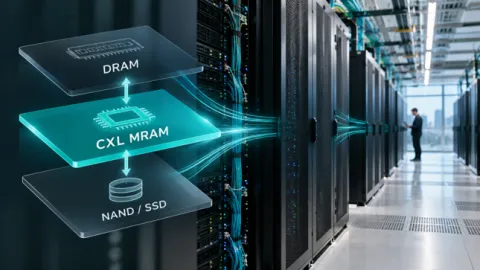
MRAM has been solving persistent-write problems in enterprise storage for years. CXL gives us a way to bring that same persistence much closer to the processor.
That is what makes this interesting.
Everspin has already demonstrated CXL-attached DDR4 MRAM using an FPGA-based CXL platform and Everspin MRAM DIMMs. The platform passed memory stress and stability testing, including Google’s stress application used to demonstrate memory stability in enterprise environments. Now we want to move beyond basic platform validation and put customer-relevant workloads on it.
The question we are trying to answer is straightforward:
How much can system performance improve when CPUs, GPUs and other accelerators spend less time waiting on storage?
How is CXL different from NVMe?
Both CXL and NVMe use PCIe as the physical transport, but they were designed around different jobs.
NVMe was optimized around storage. CXL was designed to support memory and processor/accelerator attachment, too. For MRAM, that opens up a different way to connect into systems.
With an NVMe SSD, write-access latency is typically measured in hundred of microseconds. With CXL-attached MRAM, the MRAM write plus the CXL interface latency can be measured in hundreds of nanoseconds.
From an access-latency perspective, you are moving persistent storage much closer to the DRAM domain.
The goal is to reduce the time processors spend waiting for storage to complete an operation so they can spend more time doing useful work. If that translates into higher XPU utilization, the value goes beyond performance. It means getting more productive work from expensive compute infrastructure, which can improve both CapEx and OpEx.
Is Power Loss Really a Concern in a Data Center?
That question comes up frequently. The first reaction is often, “We have backup power. Why do I care?”
Because losing utility power is only one way volatile data disappears. A server can crash. A system can reboot. If important information exists only in DRAM at that point, it is gone.
The traditional answer is checkpointing. Move the important information out of DRAM and into storage so it can be recovered after restart. Now you are back to the storage path and its latency.
Battery-backed DRAM takes another approach. Keep the DRAM alive long enough to move its contents into NAND when power fails. It works, but that means DRAM, a battery-backed unit, NAND and the circuitry and software needed to make the transfer happen correctly when something has already gone wrong, with the looming risk of a battery failure.
MRAM changes that part of the architecture because the data is already persistent once the write completes.
Where does CXL MRAM fit in the Memory Hierarchy?
We do not see this primarily as a component-replacement story.
MRAM in many of these use cases is not a component displacement. It is a system solution. The CPU still needs DRAM. DRAM remains closely coupled to the processor because of its performance, bandwidth and capacity characteristics.
NAND is not going away either. It remains extremely effective for storing very large amounts of data at low cost.
CXL MRAM adds a persistent tier for data that needs much lower write latency than the storage path can provide.
One use case is a persistent write buffer or cache in front of NAND. DRAM can continue serving the workloads where volatile memory is acceptable. NAND remains the large-capacity compute storage layer. MRAM handles selected persistent data where small writes, latency or recovery are becoming bottlenecks.
That is also why comparing MRAM and NAND strictly on dollars per gigabyte can lead you in the wrong direction. They are solving different problems in the system.
Small Writes are Where this Gets Interesting
Small writes can create a disproportionate amount of pain in a storage system.
NAND is very effective for high-capacity storage, but small payloads are harder to handle efficiently unless they are accumulated first. That adds latency exactly where applications with lots of small writes can least afford it.
MRAM is particularly interesting when you have many small pieces of persistent data changing frequently.
Transactional databases are one example. Metadata is another. Key-value cache activity and other small data structures can create similar behavior.
Everspin has already been serving data center storage applications for 15 years. MRAM has been used for journal memory, persistent buffering, metadata and computational storage. IBM FlashCore, for example, uses MRAM for metadata, consistency data, redirection tables, telemetry and other small pieces of information that are important to how the storage subsystem operates.
CXL builds on that history by giving persistent MRAM another way to connect closer to the processor.
Which Workloads Benefit Most from CXL MRAM?
The honest answer is that it depends on the workload. The more frequent the writes, the smaller the writes and the greater the write latency sensitivity the more interesting the opportunity becomes.
From there, the details matter.
How large are the writes? How often do they occur? Is the processor spending time waiting for persistent storage? Is storage performance limiting the rest of the system? And how much low-latency persistent memory would it take to change that?
Those are the questions that determine whether CXL MRAM can make a meaningful difference.
That lets the small-writes section explain the technology and examples, while the workload section helps the customer determine whether they have the problem.
How Much CXL MRAM does a System Really Need?
Potentially much less than people assume.
One of the easiest mistakes to make is starting the conversation with the price of MRAM per gigabyte and comparing it directly with NAND.
That misses the architecture discussion as it is not one or the other – they create greater value together.
In one IBM FlashCore configuration, 256 MB of MRAM supports up to 100 TB of NAND storage. You do not need MRAM to replace terabytes of storage to change how the system behaves.
IBM is using MRAM where persistence, write performance and latency create enough value to justify that portion of the architecture. That is a much more useful way to think about CXL MRAM.
Instead of asking how much MRAM you can put in a server, ask:
How much persistent, low-latency memory does this workload actually need?
What about Endurance?
This was one of the tougher questions and it is one we should be asking.
If MRAM is used as a cache and the architecture continually writes the same location, endurance matters.
You cannot brute-force the device and assume memory technology makes the engineering problem disappear.
Existing deployments have had to engineer around this too. Data placement, leveling and workload management all matter. IBM faced the same issue in its persistent-memory architecture and designed the system around the endurance available from the memory.
A generic endurance number tells you one thing. Understanding where the writes occur, how frequently they occur and how the data moves through the system tells you whether the architecture works.
Is this a New, Unproven Memory Technology?
No.
The new part is the CXL connection, not MRAM’s role in enterprise storage.
Everspin’s demonstration takes a memory technology already proven in data-center storage and exposes it through CXL, bringing persistent MRAM closer to CPUs, GPUs and other processors. The platform shows that the concept works. The next question is where it creates the most value.
Transactional databases? Metadata? Checkpointing? AI infrastructure? Another workload where small, persistent writes are holding the system back?
We do not want to guess.
Bring us the Workload
We have a working CXL MRAM platform. The next useful step is not another generic benchmark.
It is putting workloads on it that represent real problems customers are trying to solve.
Where are the small writes?
What information needs to survive a server crash or restart?
Are CPUs or GPUs waiting on persistent storage?
How much persistent memory would change that?
Those are the conversations we want to have.
Bring us your workload. Let’s measure it.